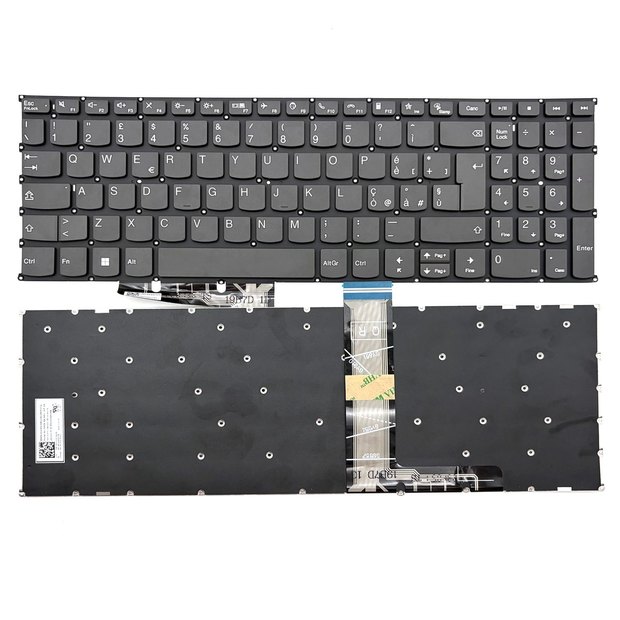
Italian Keyboard For Lenovo IdeaPad 1-15ALC7 1-15AMN7 1-15IAU7 1-15IGL7 1-15IRU7 1-15IJL7 1-15ADA7 82R1 AIR 15 2021
Lenovo
$14.99
Need a different quantity or a part that is not listed? Send an inquiry — we confirm compatibility before shipping.
Description
Italian non-backlit replacement keyboard for Lenovo laptops.
Compatible laptop models 8
1-15ALC71-15AMN71-15IAU71-15IGL71-15IRU71-15IJL71-15ADA782R1
Manufacturer part numbers 7
1-15ALC71-15AMN71-15IAU71-15IGL71-15IRU71-15IJL71-15ADA7
Please review the following information
Backlighting requires motherboard support. If available, the backlight can be activated.
Please note that the part number (PN) on the item you received may differ from the PN listed in the title. We can only confirm that our item is compatible with the PN we advertised. If you require the exact PN, please contact us before placing your order.
If the keyboard has no frame, please make sure that your new keyboard purchase has an EU-style “7” shape enter key or a US-style rectangle shape enter key that is the same as your old keyboard’s. Otherwise, the keyboard won’t fit your keyboard Frame / TopCase / C-Cover.
Keyboard layout & languages
| Layout | Language | Extra symbols |
|---|---|---|
| UK | United Kingdom English | £ |
| US | United States English | — |
| UI | United States English (International) | € |
| FR | French (Français) | à ç è é ô ù |
| GR/DE | German | Ä ä ö ü ß |
| IT/ITA | Italian | à è é ì ò ù |
| LA-SP | Español (Spanish) | ñ á í ó ú ü ¿ ¡ |
| PO/POR | Portuguese (Português) | ç ã õ á |
| SW/CH | Swiss / Germanic | ä è ö |
| NE/ND | North Europe (Nordic) | æ ø ö å |
Note: different language versions of a keyboard are universal. When the language version you need is out of stock, it may be replaced by another language version.
Warranty
30 days money-back guarantee
Our objective is to convert partial customer satisfaction into “Total Customer Satisfaction”. To achieve this we provide a 30-day money-back guarantee, except for warranty and return for defects.
3 months warranty
We also offer a 3-month warranty on our keyboards from the purchase date. Please note that replacement items do not extend or restart the warranty period.
Please note: to qualify for reimbursement it is essential that you contact our customer service team first to obtain the necessary instructions before returning your parcel. See our Returns & Refunds and Warranty pages.
Laptop keyboards FAQ
Q: How do I find out what keyboard my laptop has?
A: A part number is a unique identifier assigned to a part to simplify referencing and to unambiguously define a part within a single manufacturer. Knowing the part number makes it easier and more accurate to buy the correct keyboard — and it is comparatively more accurate than searching by the laptop’s model name. If the part number isn’t easily accessible, refer to your laptop manufacturer’s website.
To locate the model name / number of your device, follow these steps:
- Most laptops place this information on the lower side of the device. First, unplug the laptop from any AC cable and shut it down.
- Turn the laptop over and keep it in a safe place.
- On the base of the laptop you may see a label with the icon of your computer manufacturer printed on it.
Q: When should I replace my laptop keyboard?
A: For those who type a lot during the day, especially for work, having light keys to use is important. If your keys are stiff or hard to press down, typing can become a chore. A keyboard with broken keys is not enjoyable to use, whether they stopped working due to a coffee spill or rage gaming. If the keyboard doesn’t work properly, it can become a nightmare to deal with.
Q: How do I extend the lifespan of my laptop keyboard?
- Keep your keyboard in good condition; it’s important to clean it regularly using a soft cloth to remove dirt or dust.
- Additionally, it’s best to avoid spilling liquids on your keyboard and to refrain from hitting the keys too hard, as this can cause them to wear out more quickly.
- When not in use, store your laptop in a cool and dry place.
Q: How do I use a laptop keyboard safely?
A: Using your keyboard properly can help avoid soreness or injury to your wrists, hands and arms, particularly if you use your notebook for long periods. Here are a few tips to help improve keyboard use:
- Position your keyboard at elbow level, with your upper arms relaxed at your sides.
- Center your keyboard in front of you. If your keyboard has a numeric keypad, you can use the spacebar as a centering point.
- Type with your hands and wrists floating above the keyboard, so you can use your entire arm to reach distant keys instead of stretching your fingers.
- Refrain from resting your palms or wrists on any surface while typing. If your keyboard has a palm rest, use it only during breaks from typing.
- Type with a light touch and maintain straight wrists.
- Relax your arms and hands when not typing.
Payment methods
| Method | Status | Details |
|---|---|---|
| PayPal | Accepted | Pay securely with your PayPal balance, or with Mastercard, Visa, American Express, Discover or JCB through the PayPal checkout — no PayPal account required. |
| Credit / debit card | Accepted | Visa, Mastercard, American Express, JCB, Diners Club, Maestro and more, paid directly on our checkout. Card details are handled by our payment provider (Airwallex) and are never stored on our servers. |
| Bank transfer | Accepted | For orders above US$300, or if card payment is not available in your country, contact sale@comolado.com and we will send our bank account details. |
Note: we use PayPal Express Checkout, so the order will be shipped to your PayPal address. If you want to change the address, update it in your PayPal account in time. We are not responsible for wrong or undeliverable addresses.
Note: the safest option available to you is to store your personal information in your PayPal account rather than on our website. By doing so you can be confident that your information is always kept secure.
Shipping
We ship worldwide using standard shipping only — no express upgrades at the moment.
| Carrier | Typical transit | Used for |
|---|---|---|
| Yanwen (燕文) | 5–14 days | Main lanes: North America, Europe, Asia |
| Yuntu / Cloudway (云途) | 5–14 days | Main lanes where Yanwen is not available |
| Postal air small packet (邮政航空小包) | 10–20 days | Fallback for remote destinations, e.g. South America |
Delivery to most countries takes approximately 5–14 days after dispatch (remote destinations can take longer). Tracking is provided by email once the parcel is handed to the carrier.
We do not ship to India, South Asian countries and island destinations. If your delivery address is in one of those countries, checkout will not offer payment — please contact us to discuss alternatives.
Import duties and local taxes, where applicable, are the customer’s responsibility. See Shipping & Delivery for the full policy.
Disclaimer: information on this website contains certain brand trademarks, which are used only to indicate that our products are compatible with those brands. Comolado.com is not affiliated with any of the manufacturers listed. Any registered trademarks or model names listed above are used only to indicate compatibility.
Send an inquiry
Tell us your laptop model and the part you need. We reply with compatibility confirmation and a quote.
Read this before you buy
- With frame or without? A "no frame" keyboard is the keyboard layer only; a "with frame" one includes the surrounding top case. Compare with the part you are replacing.
- Enter key shape. EU-style keyboards have a tall 7-shaped enter key; US-style have a wide rectangle. Check your old keyboard — a mismatch will not fit your top case.
- Backlight needs motherboard support. If your original keyboard was not backlit, a backlit replacement may not light up.
- The part number printed on the item may differ from the number listed here. We confirm compatibility with the part number(s) we advertise. If you need an exact part number, ask us before ordering.
Not sure which one fits? Send us a photo of your old keyboard and we will confirm before you order.
Shipping & warranty
- Dispatched within 48 hours after payment, and no later than 96 hours.
- 30-day money-back guarantee and a 3-month warranty from the purchase date.
- We email you a tracking number as soon as your parcel is on its way.
- Before returning anything, contact us first for an RMA number.
Layout & language reference this keyboard: Italy
| Layout | Language | Characters printed on the keys |
|---|---|---|
| US | United States English | plain US layout |
| UK | United Kingdom English | £ |
| JAPAN | Japanese 日本語 | 日本語 / かな |
| Brazil | Portuguese (Brazil, ABNT) | ç ã õ á é |
| Korea | Korean 한국어 | 한글 |
| Germany | German Deutsch | Ä ä Ö ö Ü ü ß |
| France | French Français (AZERTY) | à ç è é ô ù |
| Belgium | Belgian French / Dutch (AZERTY) | à ç è é |
| Spain | Spanish Español | ñ á í ó ú ¿ ¡ |
| Nordic | Nordic (DK / NO / SE) | Æ Ø Å Ö Ä |
| Finland | Finnish Suomi | Ä Ö Å |
| Iceland | Icelandic Íslenska | Á Ð É Í Ó Ú Ý Þ Æ Ö |
| Italy this one | Italian Italiano | è é à ò ù |
| Portugal | Portuguese Português | ç ã õ á é |
| Netherlands | Dutch Nederlands | US-like |
| Swiss | Swiss German / French | ä ë ö ü |
| Czech | Czech Čeština | ě š č ř ž ý á í é |
| Hungary | Hungarian Magyar | á é í ó ö ő ú ü ű |
| Bulgaria | Bulgarian Български | Cyrillic |
| Russia | Russian Русский | Cyrillic |
| Greece | Greek Ελληνικά | Greek |
| Turkey | Turkish Türkçe | ç ğ ı İ ö ş ü |
| Hebrew | Hebrew עברית | RTL Hebrew |
| AR | Arabic العربية | RTL Arabic |
| Thailand | Thai ไทย | ก ข ค |
| Chinese | Chinese 中文 | 中文 / pinyin |
Layout versions of the same keyboard are physically interchangeable, but the printed keys differ. Always match the layout of the keyboard you are replacing — or ask us to confirm before you order.